MIDIBRAIN
Performance-first MIDI middleware for Raspberry Pi and desktop. Patch your rig on a node canvas, apply it, and it runs headless.
- Public alpha
- v0.1.0
- MIDI
- MIDI middleware · Pi & desktop
- Python / FastAPI
Summary
MIDIBRAIN sits between your controllers and your instruments. You build the rig in a browser, on a node canvas: controllers, MODs, operators, snapshots, a clock and destination devices, joined by wires. Press Apply to rig and it keeps running on a Raspberry Pi or your laptop with the browser closed.
It only handles MIDI. Audio stays in your instruments and mixer.
0.1.0 is the first public release. The code is on GitHub. It is early and has been tested on a small set of hardware, so expect rough edges.
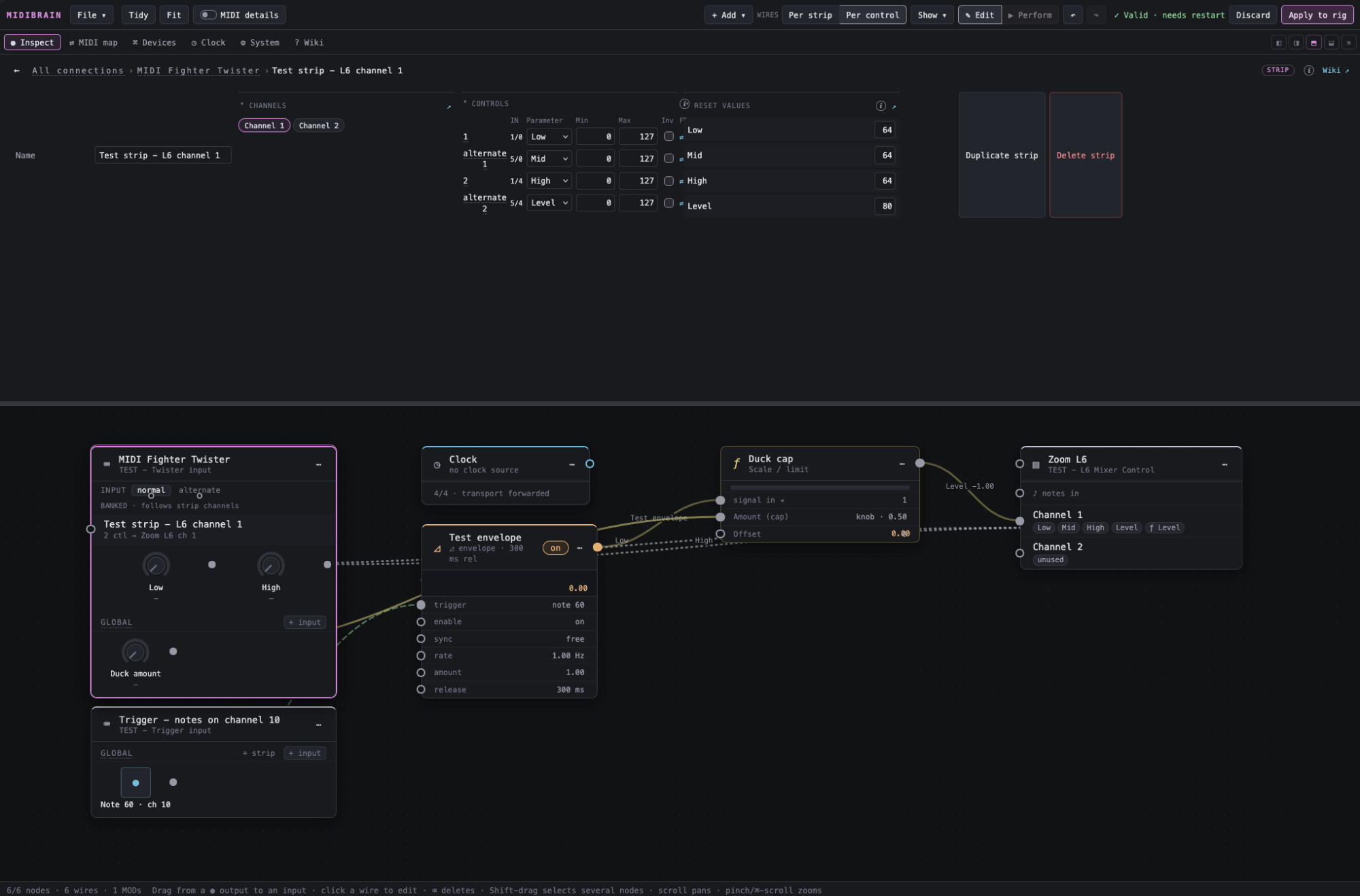 A rig on the canvas: a MIDI Fighter Twister strip drives a Zoom L6 channel, while a note-triggered envelope ducks the channel level through a “Duck cap” operator.
Try it without hardware
Demo mode simulates devices, so you can build a full rig before plugging anything in. You need Python 3.11 or newer. On Linux, install the ALSA headers first (sudo apt install libasound2-dev).
1
2
3
4
5
git clone https://github.com/clewis10/midibrain.git
cd midibrain
python3 -m venv .venv
.venv/bin/pip install -e .
.venv/bin/midibrain-mixer demo --web --port 8791
Then open http://127.0.0.1:8791/. The built-in wiki is at /manual.
For a Raspberry Pi 4 or 5, follow the Pi guide. It covers listing ports, a first manual run and starting on boot with systemd.
Snapshot
- Status: public alpha, v0.1.0
- Runs on: Raspberry Pi (Ubuntu or Raspberry Pi OS) and desktop
- Stack: Python,
mido+python-rtmidi, FastAPI, and a plain HTML/CSS/JS interface - Storage: JSON rig files. No database, cloud service or Node build step.
- Source: github.com/clewis10/midibrain
What’s in 0.1
- Patch canvas. The rig is the graph. Every node and wire maps to the saved configuration, so there is no second routing model to keep in sync. Edit mode configures, Perform mode sends live values from the canvas.
- Controllers. Strips of knobs and faders, up to eight input layers (banked or direct), MIDI layer switching, global buttons and keys, plus value feedback to LED rings and motor faders.
- Devices. Channels and named parameters with ranges, defaults and reset rules. CC maps import from the Pencil Research MIDI dataset catalogue.
- MODs. Sine, triangle, saw, square, random (sample-and-hold with slew) and envelopes. Free-running or synced to clock, looped, triggered or one-shot. MODs can modulate other MODs. Note-triggered envelopes on a volume curve give you MIDI sidechain ducking.
- Operators. Small math nodes: sum, average, multiply, min/max, scale and limit, curve, quantize to a scale, and smoothing.
- Keyboard routes. Key splits, transpose, scale quantize, fixed velocity and expression pass-through. Every route setting can be modulated.
- MIDI Thru. Direct CC copies between ports with remapping, scaling and inversion.
- Snapshots. Capture and recall parameter states from controller buttons, either instantly or queued to land on the one.
- Clock. Follows incoming MIDI clock for synced MODs and next-bar actions, and forwards transport to other gear.
- Built-in wiki. Searchable, bundled with the app and works offline. Every inspector panel links to its entry.
Gallery
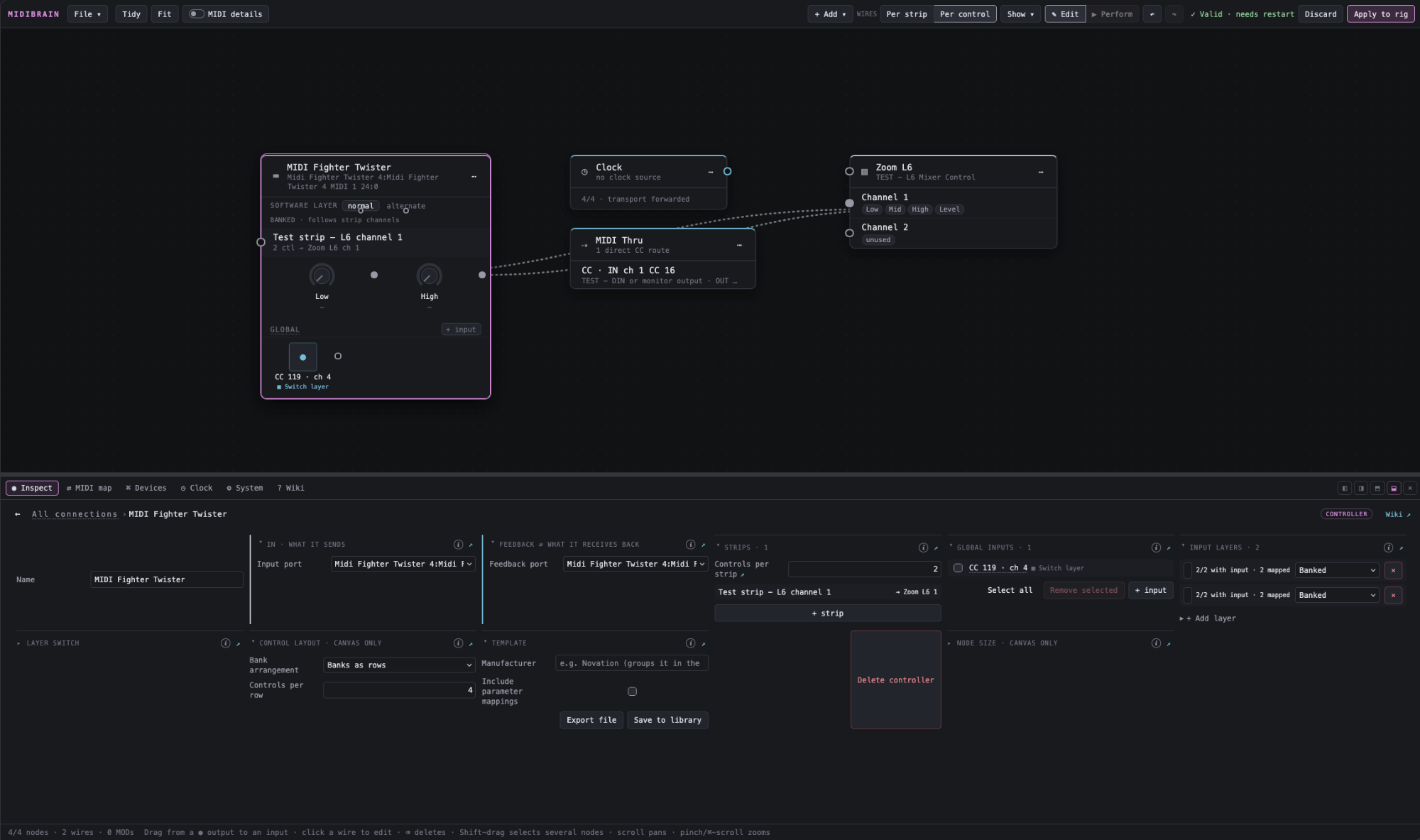 Controller inspector: input and feedback ports, strips, global inputs and input layers. A MIDI Thru route copies one CC straight to the mixer.
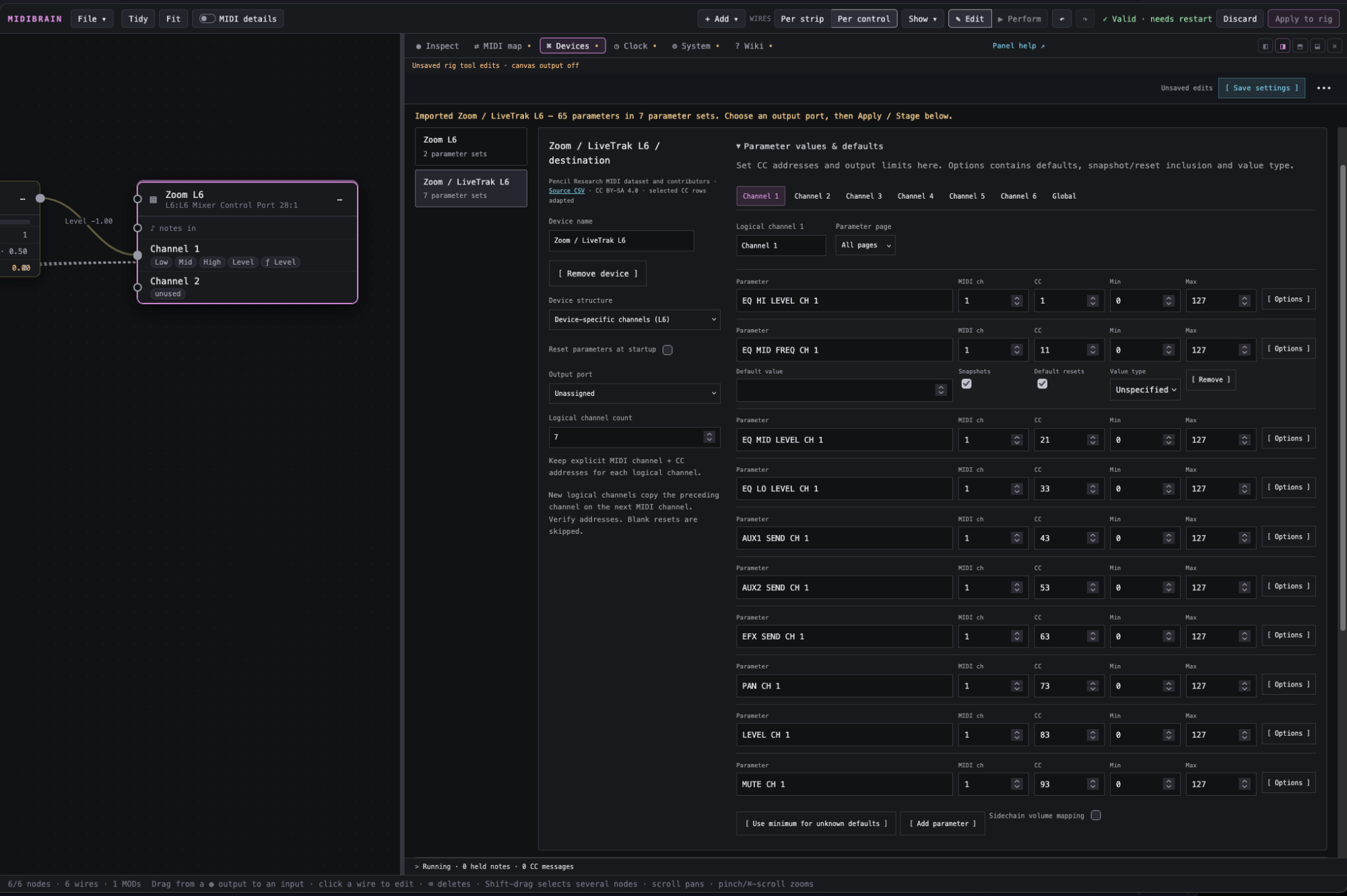 Devices: a Zoom LiveTrak L6 imported from the catalogue, 65 parameters in 7 sets, with per-parameter MIDI channel, CC, range and defaults.
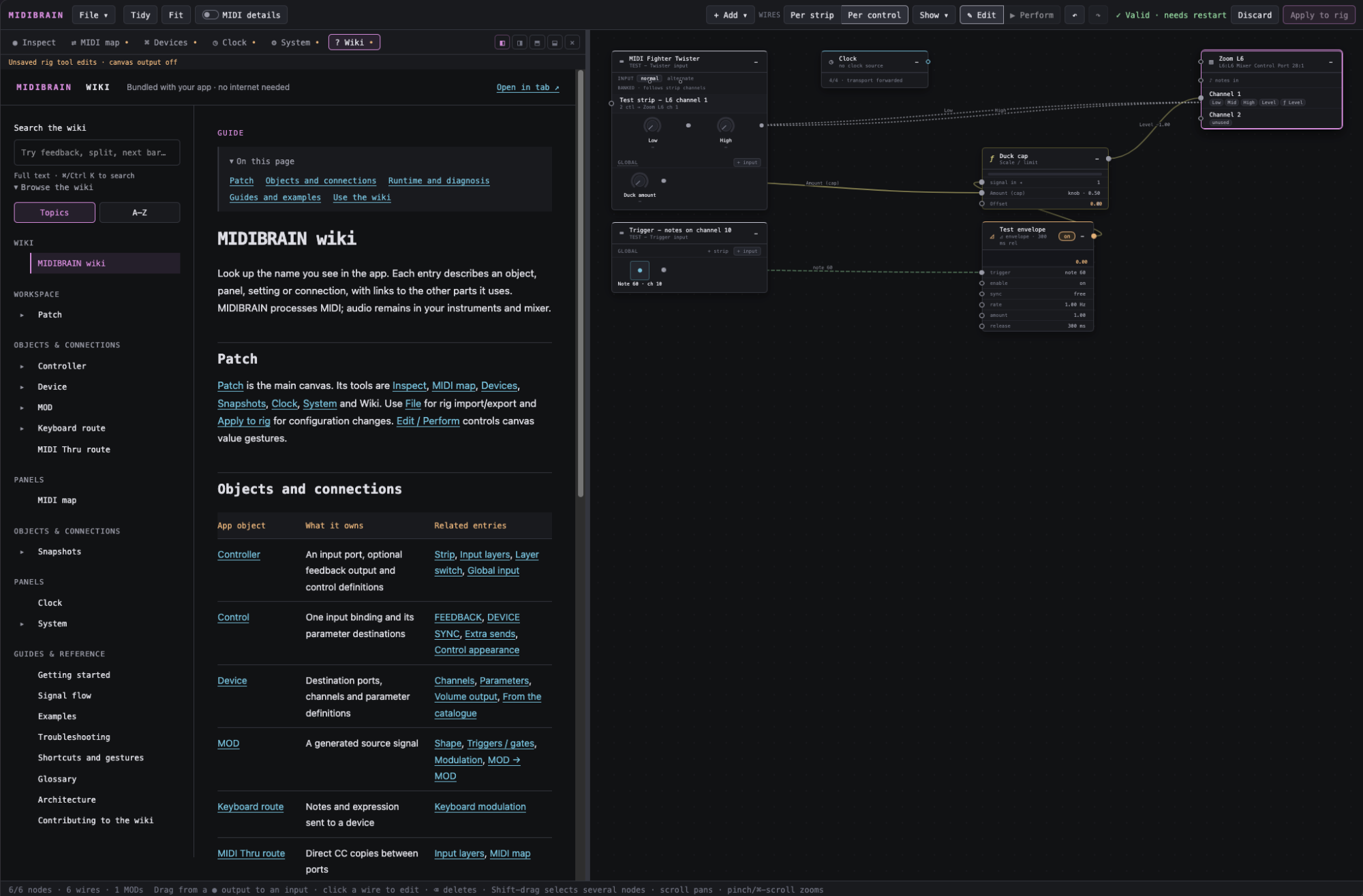 The wiki opens beside the canvas and needs no internet connection.
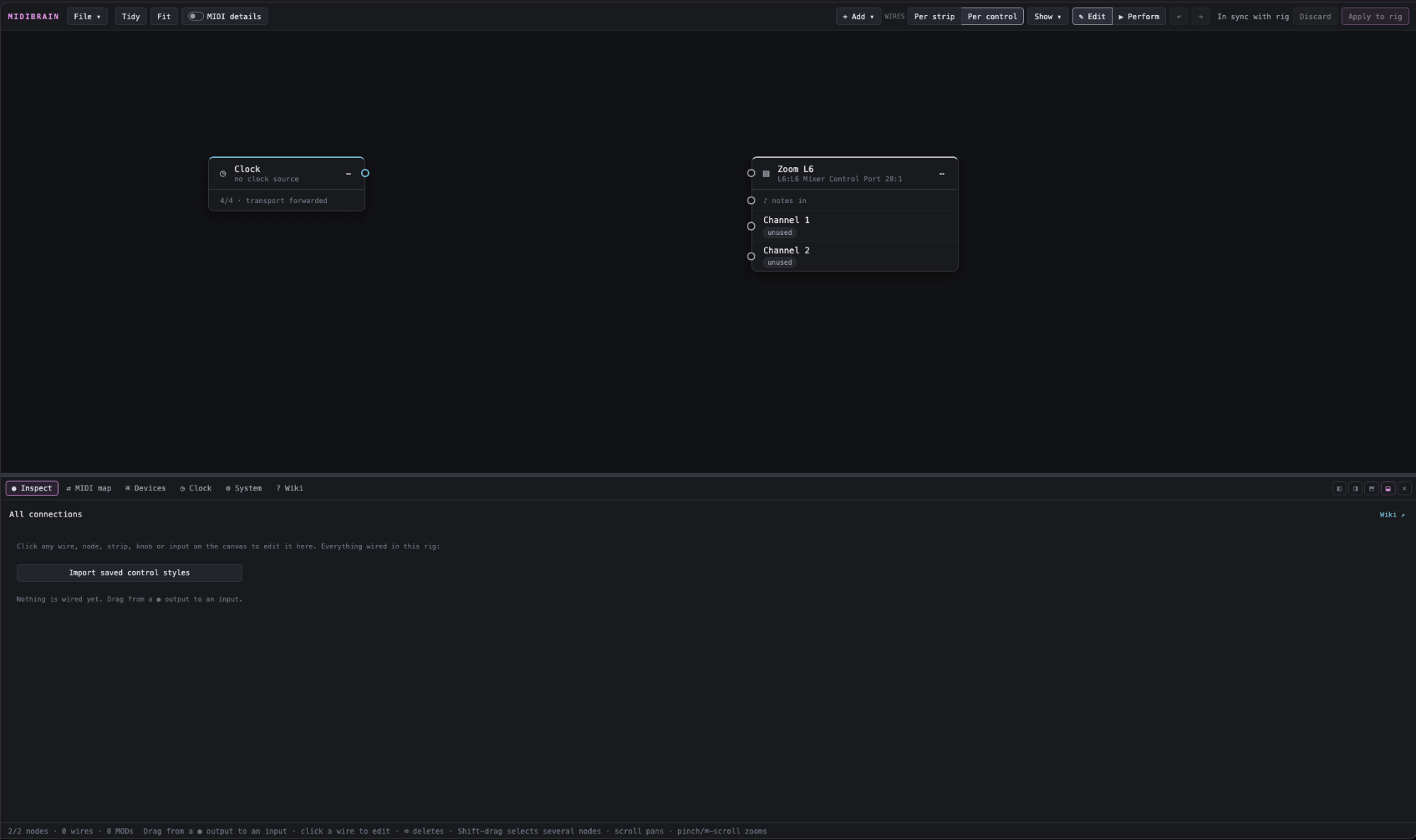 A new rig starts almost empty: a clock and whatever devices you add.
Known limits in 0.1
- 7-bit CC only. NRPN and 14-bit CC rows are skipped on import.
- No pickup mode yet, so fixed-position knobs can jump after a snapshot recall. Encoders that accept feedback are fine.
- Keyboard note routes work in the demo but have not been tested on hardware.
- The web UI has no login. Only bind to
0.0.0.0on a network you trust, or reach the Pi through an SSH tunnel.
The old roadmap for this project (a modulation runtime, scene recall and controller feedback) all shipped in this release as MODs, snapshots and FEEDBACK. What comes next depends on what breaks on more hardware, so bug reports with your controller and device models are the most useful thing you can send.
Technical Docs
How MIDIBRAIN is put together. The repository’s docs/ENGINE_ARCHITECTURE.md goes deeper.
Architecture
- Python 3.11+ handles timing, state, configuration and routing.
- mido with the python-rtmidi backend talks to the operating system’s MIDI stack.
- FastAPI and Uvicorn serve the editor and its API from a background thread when
--webis on. - The browser interface is plain JavaScript, HTML and CSS, with no framework or build pipeline.
- Rigs are saved as JSON, with snapshots in a separate sidecar file.
- On a Pi, systemd starts the process on boot and restarts it if it exits.
The main thread runs MIDI processing. Web handlers and the runtime share a session behind a reentrant lock, and a separate writer thread persists snapshot captures. Closing the browser leaves the engine running.
Following one knob turn
- The runtime polls the input port and receives a control change.
- Diagnostics record it, and MIDI learn gets a chance to observe it.
- Explicit MIDI Thru routes are handled by the port router. Controller roles also feed the bank engine. These are separate paths.
- The bank engine finds the binding by controller, MIDI channel and CC.
- The binding picks its destination parameters, scales or inverts the value within their limits, and updates their base values.
- Active MODs are combined with those base values. Volume ducking uses its own attenuation curve instead of treating CC values as linear gain.
- Output is rounded to 7-bit, unchanged values are suppressed, and the pending queue keeps only the latest value per destination, channel and CC.
- The runtime drains that queue to the MIDI outputs. Controller feedback goes through the same queued path.
Note-on messages can trigger MOD envelopes, with velocity setting the strength and note-off starting the release. Scheduled ticks keep LFOs and envelopes moving when no new MIDI arrives. Clock and transport are forwarded as ordered events and are never coalesced like parameter values.
Applying changes safely
Canvas edits are a draft until you press Apply to rig. Apply validates the whole setup first and checks the configuration revision, so an older browser tab cannot silently overwrite a newer edit. Structural changes (devices, strips, ports, routing) are saved and staged for a controlled runtime restart. MOD-only changes apply without one. Live values, saved configuration, snapshots and canvas layout are stored separately, so a saved-looking screen is never mistaken for an active hardware change.
Running on a Pi
1
2
3
4
.venv/bin/midibrain-mixer ports
cp config/performance.example.json config/performance.local.json
.venv/bin/midibrain-mixer run --config config/performance.local.json \
  --allow-unverified --web --host 0.0.0.0 --port 8788
scripts/install_service.sh installs the systemd unit, and journalctl -u midibrain -f follows the logs. To keep the editor off the network, leave out --host 0.0.0.0 and use a tunnel instead:
1
ssh -N -L 8788:127.0.0.1:8788 user@pi
Repository map
src/midibrain/performance/: the application (midibrain-mixer)src/midibrain/performance/manual/: the wiki’s Markdown sourcesdocs/: Pi setup, the patch canvas, snapshots and modulation, engine notestests/: Python unit tests, browser tests for the canvas and wiki, andtests/pi-rigs/hardware acceptance rigs with a checklist
Run the tests with:
1
2
.venv/bin/pip install -e '.[test]'
.venv/bin/python -m unittest discover -s tests -p 'test_*.py'